

SKT Forms | Free WordPress Contact Form Plugin
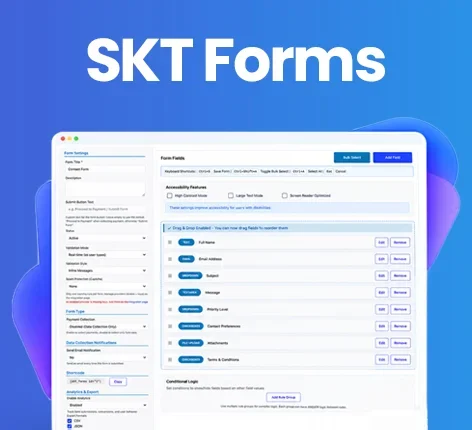

Free
For Documentation: Click Here

Build Powerful Free WordPress Contact Form Plugin Without Paying for Premium Add-ons
SKT Forms is a completely free contact form and WordPress form plugin that lets you create professional interfaces with drag-and-drop fields, ready-made templates, conditional logic, file uploads, calculations, payment gateways, notifications, analytics, and more.
Build contact forms, registration forms, booking forms, payment forms, surveys, quote forms, and more with a powerful free WordPress form builder.
Trusted by WordPress Users Worldwide:
100% Free
No Coding Required
Drag & Drop Builder
Advanced Form Features
Payment Support
Responsive Forms
What Is the SKT Forms Plugin?
SKT Forms is a versatile WordPress form plugin designed to handle everything from basic inquiries to complex data collection. Functioning as a comprehensive form builder, it enables website owners to deploy advanced data capture solutions without touching a line of code.
Whether you need a reliable contact form plugin or a robust lead generation tool, this solution provides premium-tier capabilities completely free of charge. It requires zero PHP or JavaScript knowledge, ensuring that anyone can build, manage, secure, and analyze submissions directly from their WordPress dashboard.
Build Any Form You Need With One Free WordPress Contact Form Plugin
Instead of installing multiple tools for different purposes, you can centralize your data collection.
Contact Forms
Provide a direct, spam-free line of communication for your website visitors.
Registration Forms
Capture user details effortlessly for events, webinars, or new account creations.
Booking Forms
Let clients schedule services or appointments directly through your website.
Appointment Forms
Collect preferred dates, times, and specific service requirements in one clean interface.
Quote Request Forms
Gather project specifications so you can provide accurate, tailored pricing to prospective clients.
Order Forms
Sell physical or digital products quickly without needing a heavy ecommerce framework.
Payment Forms
Process secure transactions for services, donations, or consulting fees instantly.
Survey Forms
Collect valuable audience insights and analyze responses through an intuitive dashboard.
Feedback Forms
Measure customer satisfaction and gather actionable critiques on your products or services.
Job Application Forms
Accept resumes and applicant details seamlessly with secure file uploads.
Customer Support Forms
Route technical issues and help requests efficiently to your support team.
Newsletter & Subscription Forms
Grow your mailing list by placing lightweight capture fields on your blog or footer.
Event Registration Forms
Manage attendee lists, dietary requirements, and ticket payments simultaneously.
Why Choose SKT Forms?
Completely Free
Access advanced capabilities without recurring subscriptions or premium paywalls.
Advanced Features Included
Utilize conditional logic, payment integrations, and analytics right out of the box.
No Coding Required
Build complex data-capture solutions visually without any technical background.
Drag-and-Drop Form Builder
Position and organize your inputs instantly using an intuitive visual interface.
Flexible Form Layouts
Design multi-column grids that perfectly fit your theme’s aesthetic.
Conditional Logic
Create smart, dynamic experiences that adapt based on how visitors answer previous questions.
Payment Collection
Accept major credit cards, digital wallets, and alternative payment methods securely.
Built-In Analytics
Track your conversion rates and submission volume natively.
Spam Protection
Block automated bots with multiple layers of CAPTCHA and validation security.
Responsive Forms
Ensure flawless display and usability across desktop, tablet, and mobile devices.
Powerful Features of the WordPress Contact Form Plugin
Drag-and-Drop Form Builder
As a premier WordPress form builder, SKT Forms transforms how you construct layouts. Simply select the field you need, drag it onto the canvas, and drop it into place. You can reorder inputs, configure labels, and design complex structures visually. No coding is required, making it an incredibly accessible form maker plugin for WordPress.
Ready-Made Form Templates
Don’t start from scratch. Choose from a library of professionally designed WordPress form templates, including standard contact form templates, job applications, and booking requests. Select your desired layout, customize the specific fields, modify the labels to match your brand tone, and publish instantly.
Multiple Form Field Types
Deploy over 20 specific input types to capture exactly what you need:
– Text & Textarea
– Email & Phone
– Number
– Date & Time Picker
– Dropdown, Radio & Checkbox
– File Upload
– Star Rating
– Address Block
– Hidden Fields
– Password
– Section Dividers
Multi-Column Form Layouts
Maximize screen real estate with professional, multi-column forms. The builder allows you to seamlessly configure full-width rows, 2 columns (One Half), 3 columns (One Third), or bespoke asymmetrical layouts (One Fourth and Three Fourths) without writing custom CSS.
Conditional Logic
This is what elevates a basic contact form into a dynamic application. With conditional logic, you can show, hide, enable, or disable specific fields based on a visitor’s previous selections.
Example: Ask “Do you need a quote?” If the visitor selects “Yes,” dynamically reveal the budget and timeline fields. If “No,” keep them hidden.
File Upload Fields
Securely accept resumes, project briefs, images, or client documents. A free contact form with file upload capabilities is rare, but SKT Forms provides this natively, allowing you to centralize attachments alongside user data.
Form Calculations
Transform static fields into a dynamic form calculator. Automatically compute quantities, generate pricing totals, or provide real-time estimates based on user selections.
Payment Forms
Turn any inquiry into a transaction. Our WordPress payment form functionality integrates directly with top processors. Accept payments via PayPal, Razorpay, PhonePe, PayU, Instamojo, or facilitate Cash on Delivery (COD).
Accept Payments in 50+ Currencies
Operate globally. The plugin supports payment collection across more than 50 currencies, automatically formatting order totals and passing the correct currency data to your chosen gateway.
Email Notifications
Keep your team and your customers informed. Configure custom WordPress contact form email alerts for successful submissions, failed payments, or completed transactions. Customize the subject line, sender details, and message body using dynamic placeholders to instantly route submitted data.
Form Submission Management
Never lose an inquiry in your inbox again. SKT Forms acts as a centralized database for all your contact form submissions. Access a dedicated dashboard to view, filter, sort, and organize all incoming entries, payment statuses, and transaction details directly within the WP admin area.
Form Analytics
Understand how your audience interacts with your site. Built-in form analytics track submission counts, monitor conversion trends, and help you identify where users might be abandoning the process.
Spam Protection
Protect your inbox from automated abuse. We provide comprehensive WordPress contact form spam defenses, integrating seamlessly with Google reCAPTCHA, Cloudflare Turnstile, hCaptcha, and a built-in Math CAPTCHA.
Form Validation
Ensure you receive clean, usable data. Enforce required fields, utilize strict email validation, and deploy cross-field input checks. If a user makes an error, clear, customized error messages guide them toward successful completion.
Responsive WordPress Forms
Every layout generated is inherently mobile-friendly. Whether viewed on a 4K monitor or a smartphone, your responsive contact form will automatically adapt its grid, tap targets, and typography for optimal usability.
Live Form Preview
Check your typography, alignment, and multi-column behavior in real-time. Administrators can preview exactly how the interface will render before publishing changes to the live site.
Duplicate Forms
Save hours of configuration time. Use the one-click duplication feature to clone complex layouts, conditional rules, and payment setups instantly to deploy variations across different marketing campaigns.
Form Status Control
Manage your active campaigns effortlessly. Toggle individual forms between Active and Inactive states. This allows you to temporarily close event registrations or seasonal promotions without deleting the underlying data or shortcodes.
Create Contact Forms Without Coding
Drag and Drop Fields
Select the data points you need and pull them directly onto the canvas.
Configure Field Settings
Click any input to rename labels, set character limits, or mark it as mandatory.
Customize Layout
Adjust column widths and arrange elements visually to match your site’s structure.
Add Conditional Logic
Define simple “If This, Then That” rules to make your layout dynamic and intelligent.
Add Notifications
Draft the automated emails that will trigger upon successful completion.
Publish Your Form
Copy the generated shortcode and paste it anywhere on your site. No PHP. No JavaScript. No complicated coding required.
What Types of Forms Can You Build?
Consolidate your plugin stack. One lightweight tool handles every requirement:
- Contact Forms
- Lead Generation Forms
- Registration Forms
- Booking Forms
- Appointment Forms
- Quote Forms
- Order Forms
- Payment Forms
- Survey Forms
- Feedback Forms
- Job Application Forms
- Event Registration Forms
- Support Forms
- Newsletter Forms
SKT Forms vs Other WordPress Form Plugins
When evaluating the best WordPress form plugin for your site, it comes down to what capabilities are included in the base installation.
Many popular tools offer a free tier that limits you to basic fields, requiring a paid upgrade if you want to collect payments, use conditional logic, or view analytics. SKT Forms differentiates itself by providing these advanced capabilities entirely free, making it the premier choice for users seeking premium functionality without the recurring costs.
Advanced Form Features Without a Premium Upgrade
Many popular options divide advanced capabilities between free and paid tiers. SKT Forms takes a different approach, providing a broad set of premium-level form-building capabilities entirely free.
| Feature | SKT Forms (Free) | Typical Free Form Plugins |
|---|---|---|
| WordPress Form Builder | ✓ Free | ✓ |
| Contact Forms | ✓ Free | ✓ |
| Drag & Drop Builder | ✓ Free | ✓ / Limited |
| Form Templates | ✓ Free | ✓ / Limited |
| Advanced Fields | ✓ Free | Often Limited |
| Conditional Logic | ✓ Free | Often Premium |
| File Uploads | ✓ Free | Often Premium |
| Form Calculations | ✓ Free | Often Premium |
| Payment Gateways | ✓ Free | Often Premium |
| Multiple Payment Methods | ✓ Free | Often Premium |
| Form Analytics | ✓ Free | Often Premium |
| Submission Management | ✓ Free | ✓ / Limited |
| Spam Protection | ✓ Free | ✓ / Limited |
| Multi-Column Layouts | ✓ Free | Often Limited |
| Email Notifications | ✓ Free | ✓ |
| Responsive Forms | ✓ Free | ✓ |
| Google reCAPTCHA | ✓ Free | ✓ / Varies |
| Cloudflare Turnstile | ✓ Free | Varies |
| hCaptcha | ✓ Free | Varies |
| Math Captcha | ✓ Free | Varies |
| No Coding Required | ✓ Free | ✓ |
| Elementor Compatibility | ✓ Free | Varies |
| Gutenberg Compatibility | ✓ Free | Varies |
| Divi Compatibility | ✓ Free | Varies |
Payment Forms Without a Separate Payment Plugin
Collect revenue directly through your data capture fields. Perfect for order forms, event registration payments, consulting bookings, charity donations, or service inquiries.
Supported integrations include:
- PayPal
- Razorpay
- PhonePe
- PayU
- Instamojo
- Cash on Delivery (COD)
- 50+ Currency Support
Build Smart Forms With Conditional Logic
Stop overwhelming visitors with irrelevant questions. Conditional logic ensures a streamlined, highly converting user experience.
- Example 1: Quote Form: Ask the visitor what service they need. If they select “Web Design,” dynamically display fields for “Current URL” and “Design Budget.”
- Example 2: Job Application: Ask which department the user is applying for. Reveal role-specific technical questions based on their selection.
- Example 3: Booking Form: Let the user select a consultant, then reveal only that specific consultant’s availability schedule.
- Example 4: Order Form: Allow the user to select a product, and instantly reveal size, color, or quantity options relevant to that item alone.
Form Security & Spam Protection
Protect your data integrity and your inbox without compromising user experience.
Google reCAPTCHA
Deploy industry-standard invisible or challenge-based bot protection.
Cloudflare Turnstile
Utilize a privacy-focused, highly efficient CAPTCHA alternative.
hCaptcha
Protect against automated abuse while maintaining strict privacy compliance.
Math Captcha
A simple, built-in numerical challenge requiring no third-party API integration.
Field Validation
Ensure data is formatted correctly (e.g., proper email syntax) before submission is allowed.
Secure Form Processing
All payment and external-service data is transmitted using encrypted, supported secure connection methods to maintain compliance.
Form Builder Compatibility
Designed to integrate seamlessly with the tools you already use to build your site.
Elementor
Embed effortlessly within Elementor or Elementor Pro layouts using native widgets.
Gutenberg
Drop shortcodes directly into the native WordPress Block Editor for immediate rendering.
Classic Editor
Fully supported for legacy site architectures.
Beaver Builder
Insert your data capture fields flawlessly into Beaver Builder column structures.
Divi
Works seamlessly alongside the Divi visual builder without CSS conflicts.
Other WordPress Page Builders
Compatible with virtually any visual site creator that supports standard WordPress shortcodes.
How SKT Forms Works with WordPress Website?
1.Choose Template:
Start with a blank canvas or select a pre-built layout.
2.Add Fields:
Drag the required inputs directly into the builder.
3.Customize Layout:
Adjust columns and typography to match your site design.
4.Configure Logic:
Set up dynamic rules to show or hide specific fields based on user input.
5.Configure Notifications:
Write the automated emails that will trigger upon completion.
6.Configure Payment:
Connect your preferred gateway if you are collecting funds.
7.Publish:
Embed the shortcode anywhere on your site.
8.Receive Submissions:
Manage incoming data securely from your centralized WP dashboard.
9.Analyze Results:
Review built-in analytics to optimize conversion rates.
How to Create a Contact Form in WordPress
1.Install SKT Forms:
Download the plugin, upload it to your WordPress dashboard, and click Activate.
2.Create a New Form:
Navigate to the new menu item and click “Add New.”
3.Choose a Template:
Select the standard Contact layout to save time.
4.Add Form Fields:
Drag any additional inputs (like a phone number or file upload) into the structure.
5.Customize the Form:
Adjust field labels, placeholder text, and column widths.
6.Configure Notifications:
Set the destination email address to ensure you receive the inquiries.
7.Configure Spam Protection:
Enable your preferred CAPTCHA method to block bots.
8.Publish the Form:
Save your work and copy the provided shortcode.
9.Test the Form:
Paste the shortcode on your Contact page and submit a test inquiry.
How to Build a WordPress Contact Form With SKT Forms
Whether you are designing a simple contact form, an advanced conditional form, a dynamic calculation form, or a secure payment form, the workflow remains identical. The drag-and-drop interface ensures you can scale from a basic three-field layout to a complex, logic-driven application without ever switching tools or learning code.
How to Add SKT Forms to Your WordPress Website
Publishing is incredibly straightforward. Every saved configuration automatically generates a unique shortcode (e.g.,
Form not found.
).Simply copy this code and paste it into any Gutenberg block, Elementor widget, page builder module, or standard text widget. The layout will instantly render and inherit your theme’s core styling.
SKT Forms for Lead Generation
Turn traffic into actionable prospects.
Contact Leads
Provide a frictionless way for prospects to initiate conversations.
Quote Requests
Capture detailed project scopes to qualify high-value leads immediately.
Consultation Requests
Schedule introductory calls efficiently.
Demo Requests
Allow enterprise clients to request personalized software walkthroughs.
Customer Enquiries
Route product questions directly to your sales team.
Newsletter Signups
Grow your audience with lightweight, high-converting subscription boxes.
(Form submissions trigger instant notifications, allowing your team to execute rapid lead follow-up while the data is safely stored in your centralized dashboard.)
SKT Contact Form for Businesses
Service Businesses
Capture detailed client briefs and schedule initial consultations.
Agencies
Manage specialized onboarding questionnaires and project file uploads.
Freelancers
Accept secure payments for consulting blocks or digital services.
Consultants
Use conditional logic to qualify leads before they reach your inbox.
Ecommerce Businesses
Deploy custom order flows or pre-sale product inquiries.
Educational Websites
Manage student registrations, course payments, and feedback surveys.
Healthcare Websites
Provide secure appointment request portals.
Real Estate Websites
Capture property inquiries and schedule viewing appointments.
Event Businesses
Handle ticketing, attendee tracking, and dietary requirement collection.
Membership Websites
Process detailed account applications and user profile data.
SKT Forms for WooCommerce
Enhance your store’s functionality. While WooCommerce handles the core shopping cart, you can utilize our WordPress form plugin for specialized tasks:
- Custom order forms for bespoke products.
- Detailed pre-sale product enquiries.
- B2B bulk quote requests.
- Standalone payment forms for custom invoices.
- Gathering specific customer information post-purchase.
Why SKT Contact Forms Is Different
Completely Free
No premium paywalls for core capabilities.
Advanced Form Builder
Visual drag-and-drop construction.
Payment Gateways Included
Accept funds natively.
Conditional Logic Included
Build smart, reactive interfaces.
File Uploads Included
Accept attachments safely.
Analytics Included
Track views and conversion rates.
Multiple Spam Protection Options
Turnstile, reCAPTCHA, and more.
No Coding Required
Accessible to beginners and experts alike.
Page Builder Compatibility
Works with Elementor, Divi, and Gutenberg.
Responsive Forms
Flawless display on all devices.
Who Should Use SKT Forms?
Website Owners
Manage all site interactions from one free, unified plugin.
Small Businesses
Collect payments and generate leads without expanding your software budget.
Agencies
Deploy a robust, standardized data collection tool across all client builds.
Freelancers
Capture project requirements and initial deposits effortlessly.
Developers
Enjoy a clean, well-coded architecture that plays nicely with major page builders.
WooCommerce Stores
Supplement your cart with complex inquiry and custom order interfaces.
Bloggers
Grow your mailing list and manage brand partnership inquiries.
Consultants
Qualify leads intelligently using dynamic conditional logic.
Organizations
Manage volunteer signups, event registrations, and donation processing.
Conclusion
Building a professional, high-converting data collection system shouldn’t require expensive monthly subscriptions or complex coding. SKT Forms bridges the gap by offering a completely free WordPress form plugin that rivals premium competitors.
Whether you need a simple contact form to connect with your audience, a dynamic lead generation tool with conditional logic, or a secure payment portal to sell your services, this drag-and-drop form builder provides everything you need out of the box.
Empower your website with advanced functionality, robust spam protection, and seamless integrations today without spending a dime.
Create contact forms, lead forms, booking forms, payment forms, registration forms, and more with SKT Forms.
Frequently Asked Questions About SKT Forms
What is a contact form?
It is a dedicated section on a website that allows visitors to send messages directly to the site owner without needing to open their personal email client.
What is a WordPress form plugin?
It is an installable software extension that adds form-building capabilities to the WordPress CMS, allowing administrators to create and manage data collection visually.
What is a contact form plugin?
It is a specific tool designed to create secure communication portals on your website while protecting your inbox from spam.
Is SKT Forms free?
Yes. It is available to download and use without purchasing a license.
Is SKT Forms completely free?
Yes. Unlike many tools, advanced capabilities like payment processing, analytics, and conditional logic are included at no cost.
Is SKT Forms a WordPress form builder?
Yes. It provides a visual drag-and-drop interface for constructing everything from simple inquiries to complex multi-column layouts.
Can I create a contact form with SKT Forms?
Absolutely. It comes with ready-made templates specifically designed for standard inquiries.
Can I create forms without coding?
Yes. The entire creation process is visual, requiring zero knowledge of PHP, HTML, or CSS.
Does SKT Forms have a drag-and-drop builder?
Yes. You can select fields, drag them onto the canvas, and drop them exactly where you want them.
Does SKT Forms provide form templates?
Yes. It includes a library of pre-built layouts to help you launch faster.
Does SKT Forms support conditional logic?
Yes. You can create rules to dynamically show or hide fields based on user selections.
Can I upload files through SKT Forms?
Yes. A dedicated file upload field is included for capturing documents, images, or resumes.
Can I create payment forms?
Yes. You can process transactions securely right from your website.
Which payment gateways does SKT Forms support?
It natively supports PayPal, Razorpay, PhonePe, PayU, Instamojo, and Cash on Delivery.
Can SKT Forms accept payments in multiple currencies?
Yes. It supports payment processing in over 50 different global currencies.
Does SKT Forms provide form analytics?
Yes. You can track views, submissions, and overall conversion performance natively.
Can I manage form submissions in WordPress?
Yes. All entries are stored securely in a centralized dashboard within your WP admin area.
Does SKT Forms provide email notifications?
Yes. You can configure customized email alerts for administrators and automated confirmation receipts for users.
Does SKT Forms protect forms from spam?
Yes. It includes multiple layers of security to block automated bot submissions.
Does SKT Forms support reCAPTCHA?
Yes. Google reCAPTCHA integration is fully supported.
Does SKT Forms support Cloudflare Turnstile?
Yes. Turnstile is available as a privacy-focused CAPTCHA alternative.
Does SKT Forms work with Elementor?
Yes. The generated shortcodes render perfectly within Elementor layouts.
Does SKT Forms work with Gutenberg?
Yes. It is fully compatible with the native WordPress Block Editor.
Does SKT Forms work with Divi?
Yes. It integrates seamlessly with Divi and other major page builders.
Does SKT Forms work with Beaver Builder?
Yes. Your layouts will display flawlessly within Beaver Builder columns.
Are SKT Forms responsive?
Yes. Every layout automatically adapts to provide optimal usability on mobile devices, tablets, and desktops.
Can I create WooCommerce forms?
Yes. It is an excellent tool for handling bespoke product inquiries, B2B quotes, and custom order capture alongside your WooCommerce setup.
How do I create a contact form in WordPress?
Install SKT Forms, select the Contact template, customize your fields, save the configuration, and paste the resulting shortcode onto your Contact page.
How do I add a contact form to WordPress?
Use a dedicated plugin to handle the layout, spam protection, and email routing automatically, rather than attempting to code one manually.
How do I create a WordPress form without coding?
Utilize a drag-and-drop tool like SKT Forms, which handles all the underlying PHP and database architecture for you automatically.
What is the best free form plugin for WordPress?
The ideal choice provides the specific functionality you need without paywalls. SKT Forms is highly competitive because it includes advanced logic, payments, and analytics for free.
Quick links
Categories
- Real estate
- Author
- Automotive
- Bakery
- Blog
- Business
- Church
- Construction
- Corporate
- Dentist
- Divi Child
- Ebook
- Ecommerce
- Education
- Fastest
- Fitness
- GPL
- Gutenberg
- Hotel
- Interior
- Lawyer
- Magazine
- Medical
- Multipurpose
- Music Artist
- Nature
- News
- NGO
- Non profit
- One Page
- Personal
- Photography
- Plugins
- Portfolio
- Resort
- Responsive
- Restaurant
- Spa and Salon
- Sports
- Technology
- Travel
- Wedding


© Copyright 2026 M/s. Shri Krishna Technologies