

SKT Form Creator | Gravity Forms WordPress Theme
For Original price was: $59.00.$41.00Current price is: $41.00.
For Documentation: Click Here
Gravity Forms WordPress Theme
Managing customer inquiries, registrations, and user feedback requires a high-converting web platform. Businesses, digital agencies, and freelance developers need a reliable website layout that seamlessly handles complex web elements. If your online workflow depends on user communication, finding the right Gravity Forms WordPress Theme is critical to your online success.
The SKT Form Creator WordPress Theme provides a clean, conversion-focused environment optimised for advanced visual structures. Built to integrate effortlessly with the industry-standard plugin framework, this premier Gravity Forms Theme eliminates layout styling issues. It lets you design functional, gorgeous feedback channels without writing standalone CSS code.
Powerful Core Features of Gravity Forms WordPress Theme
1. Drag-and-Drop Building Compatibility
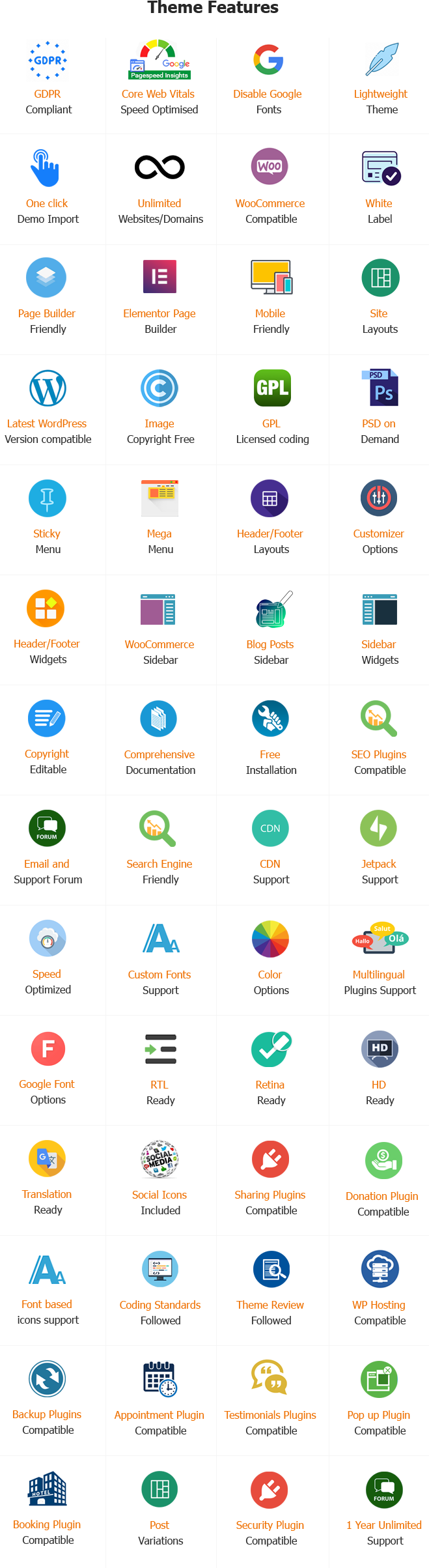
Customise your landing pages and customer touchpoints quickly. The template operates natively alongside popular live editing platforms like Elementor and Gutenberg. This compatibility allows you to adjust headers, insert promotional blocks, and position complex sections without altering core theme code.
2. Clean Responsive Architecture
More than half of your web visitors browse using mobile devices. The Gravity Forms WordPress Theme fluid grid framework automatically scales multi-column forms down to vertical smartphone screens. This layout styling prevents input overlap, making text entry fields highly readable on mobile devices.
3. E-Commerce Compatibility and Add-on Support
Turn basic web forms into interactive payment systems. The template fully supports premium platform features, enabling you to deploy automated workflows, custom registration panels, and digital store checkouts. It securely connects to major payment gateways such as Stripe, Square, and PayPal via the official Rocketgenius Gravity Forms extensions.
4. Search Engine Optimization (SEO) Built In
Gain higher organic visibility on search engines. Built using semantic HTML coding guidelines, the theme ensures search bots index your core pages smoothly. It supports leading optimization tools like Yoast SEO and RankMath, making it easy to handle your meta tag setups and targeted keyword campaigns.
5. Advanced Theme Options Panel
Modify global elements across your entire domain effortlessly from a single, localized dashboard. Adjust structural borders, toggle sidebars, upload custom logotypes, and tweak responsive breakpoints instantly, without managing the raw theme documentation.
6. Unlimited Color Possibilities
Incorporate your specific company brand identity throughout your front-end customer touchpoints. Use integrated native color pickers to dynamically change the background tones, text layers, field boundaries, and hover effects of active submission buttons.
7. Google Fonts and Typography Customization
Elevate text visibility and scanning readability by choosing from hundreds of valid international web typefaces. Assign specific weights and line heights to your H1 headings, H2 subheadings, paragraph elements, and text input labels.
8. Dynamic Header and Footer Layout Choices
Switch between various minimalist and advanced graphical headers depending on your site requirements. Position multi-column footer widgets to display secondary corporate links, location directions, privacy conditions or legal terms cleanly.
9. Custom Shortcode Support
Embed interactive submission blocks anywhere on your website using built-in, native shortcode commands. Deploy complex multi-page inputs or simplified subscription fields into the middle of blog entries or inside dynamic footer columns effortlessly.
10. Multi-Language and RTL Readiness
Cater to global consumers by easily translating your site text using popular multilingual plugin interfaces like WPML or Polylang. The theme code is built to adapt fully to Right-to-Left (RTL) language scripts.
11. Font-Based Social Icon Integration
Connect with your audience across major digital platforms with scalable, font-based icons. Select from over 800 built-in vectors to display clean links to your active corporate social profiles.
12. Complete Sidebar Widget Management
Control exactly where secondary content appears with custom sidebar modules. Choose to maintain classic layout configurations for your ongoing blog loops while enforcing distraction-free, full-width layouts for targeted conversion pages.
13. High-Definition Retina Display Coding
Keep your layout styling looking incredibly sharp and professional on modern high-resolution mobile devices. The template structure loads crisp vector boundaries and handles heavy visual assets cleanly across all major web browsers.
14. Performance Speed and Cache Optimization
Retain your site traffic with a lightweight core theme architecture optimized for maximum page speed scores. The Gravity Forms WordPress Theme operates seamlessly with top-tier caching tools and content delivery networks (CDNs) to reduce load times.
15. Fully GDPR Privacy Compliant
Protect user information and validate explicit consumer consent easily while complying with strict data collection regulations. The clean theme architecture allows data tools to request cookies or filter personal information fields transparently.
16. Integrated Hero Sliders and Visual Galleries
Grab your user’s focus right away with a high-resolution default homepage image slider. Embed product overview image loops or descriptive video walkthroughs directly on your landing layout to boost conversions.
17. Clean, GPL-Licensed Structural Code
Develop with complete peace of mind using a Gravity Forms WordPress Theme built on standard, open-source programming principles. The secure, unencrypted theme files protect against security issues and let developers add custom code extensions cleanly.
Fixing Common Gravity Forms Issues and Finding Help
Managing complex, multi-page data collection systems can sometimes reveal underlying technical conflicts. Using unoptimized extensions or poorly coded templates can cause common Gravity Forms issues, such as submission-loading spinners that hang indefinitely, broken conditional logic steps, or hidden styling issues.
Gravity Forms WordPress Theme resolves these configuration errors by providing an optimized environment that prevents script conflicts. If you need help with technical setups, your WP theme purchase grants you access to expert support forums, direct email assistance, and Skype customer channels. You can also browse the official Gravity Forms blog to learn advanced anti-spam filtering tips, conversion tricks, and marketing automation best practices.
Maximizing Value: Discounts, Deals, and Smart Buying
Finding premium tools at a great price keeps web development budgets under control. When preparing your project setup, keep an eye out for seasonal sales events, such as the annual Gravity Forms Black Friday promotion, to secure a Gravity Forms discount on multi-site developer licenses. Pairing those software savings with affordable premium themes helps you launch enterprise-level platforms at a fraction of the cost of standard agency services.
The SKT Form Creator Theme Download package delivers exceptional standalone value. Your single-theme bundle includes fully editable raw PSD design graphics, layered files, and comprehensive installation manuals. This provides everything you need to create custom mockups before pushing changes to your live site.
Step-by-Step Installation and Setup Guide of Gravity Theme
1. Upload and Activate the Theme File
- Log in to your personal SKT Themes My Account panel to retrieve your premium theme package.
- Open your WordPress Dashboard and navigate directly to Appearance → Themes.
- Click Add New Theme, then choose Upload Theme, and select your downloaded file.
- Click the Install Now button, then select Activate once the automated upload completes.
2. Install Core Plugin Requirements
- Click the dashboard notification prompt to activate your required structural extensions.
- Install the core Gravity Forms Plugin from your dashboard panel.
- Add optional e-commerce extensions, such as WooCommerce, if you plan to accept product payments or manage digital store items online.
3. One-Click Demo Content Import
- Navigate to Plugins → Add New and activate the official SKT Templates Plugin or importer.
- Head over to Appearance → Import Demo Content within your main dashboard menu.
- Choose the SKT Form Creator layout and click the Full Import command to load complete sample pages, column layouts, and placeholder graphics automatically.
4. Adjust Your Reading and Home Settings
- Navigate to Settings → Reading in your side control bar.
- Locate the options under Your homepage displays and toggle the checkbox for A static page.
- Assign your primary home page template to the Homepage selector dropdown menu.
- Set your designated blog archive page under the Posts page option and click Save Changes.
Conclusion
Creating a modern, conversion-focused website shouldn’t require complex custom programming or expensive troubleshooting. The Gravity Forms WordPress Theme provides a stable, highly optimized environment that highlights your call-to-action blocks and data capture panels.
By matching clean design layouts with advanced e-commerce tools and flexible drag-and-drop editors, you can launch professional lead-generation platforms effortlessly. To make deployment even easier, the development team provides a free installation service to configure the theme demo content on your web server right away.
Same theme in Our Other SiteQuick links
Categories
- Real estate
- Author
- Automotive
- Bakery
- Blog
- Business
- Church
- Construction
- Corporate
- Dentist
- Divi Child
- Ebook
- Ecommerce
- Education
- Fastest
- Fitness
- GPL
- Gutenberg
- Hotel
- Interior
- Lawyer
- Magazine
- Medical
- Multipurpose
- Music Artist
- Nature
- News
- NGO
- Non profit
- One Page
- Personal
- Photography
- Plugins
- Portfolio
- Resort
- Responsive
- Restaurant
- Spa and Salon
- Sports
- Technology
- Travel
- Wedding


© Copyright 2026 M/s. Shri Krishna Technologies