

SKT Navigation Panel | Vertical Menu WordPress Theme
For Original price was: $59.00.$41.00Current price is: $41.00.
For Documentation: Click Here
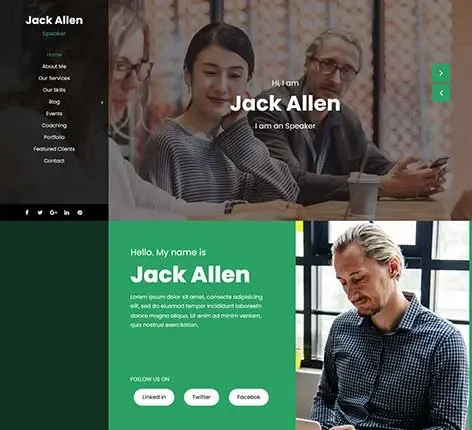
Vertical Menu WordPress Theme for Moving Beyond Traditional Top Bars
Traditional top-tier navigation bars are struggling to keep up with modern web demands. When you attempt to cram a massive product catalog, multiple language toggles, and extensive service links into a single horizontal strip, the result is a cluttered, overwhelming mess. Users despise hovering over microscopic text links that accidentally collapse just as they try to click them. To truly organize a dense, content-rich website, a fundamental shift in layout geometry is required.
Adopting a Vertical Menu WordPress Theme solves this spatial crisis completely. By moving your primary navigation to a left or right sidebar panel, you unlock infinite vertical scrolling for your links.
SKT Navigation Panel is deliberately crafted for creators, SaaS developers, and large-scale publishers who need to display dozens of categories without suffocating the main viewing area. This side-oriented framework ensures your visitors can effortlessly explore your deep content archives while enjoying a massive, unobstructed canvas for your core imagery and text.
Vertical Menu WP Template Suited for Left-Aligned Projects and Portfolios
Changing the orientation of your menu instantly alters how visitors interact with your brand. This specific Vertical Menu WordPress Theme is perfectly tailored for industries that require heavy categorization or rely heavily on striking, full-screen visual media.
Photography Portfolios
Keep the focus entirely on the photos. Hide the navigation in a sleek sidebar so your high-resolution landscape shots stretch uninterrupted from edge to edge across the browser.
SaaS Application Dashboards
Mimic the feel of a native software application. Tech companies can use side panels to organize user settings, billing history, and software tools logically for their subscribers.
Massive eCommerce Catalogs
Organize hundreds of retail departments easily. A scrolling side menu allows department stores to list endless clothing categories without creating a terrifying, screen-covering mega menu at the top of the page.
Online Museums and Archives
Guide historical researchers through dense chronological timelines. Side navigation helps students jump between different centuries and exhibits without losing their place in the reading material.
Video Game Streaming Hubs
Build a layout that feels like a gaming console interface. Streamers can align their social links, live chat popouts, and video archives in a neat, easily accessible column.
B2B Wholesale Directories
Help industrial buyers sort through heavy machinery parts. A persistent left-hand menu keeps complex filtering options visible at all times during the lengthy search process.
Independent News Publishers
Categorize daily journalism effectively. Magazines can list politics, sports, entertainment, and opinion sections in a clear, vertical stack that never disappears as the reader scrolls down a long article.
Creative Design Agencies
Stand out from generic corporate competitors. A stylish, icon-based side menu proves your agency understands avant-garde, modern web aesthetics and is willing to break traditional design rules.
Luxury Spa and Salon Sites
Maintain a minimalist, zen-like atmosphere. Tucking the booking links and service menus into a collapsible side drawer keeps the homepage feeling incredibly peaceful and completely uncluttered.
Online Learning Platforms
Track student progress visually. Educational sites can use the sidebar to display course modules, quiz links, and video chapters while the student watches the main lecture on the right side of the screen.
Recipe and Food Databases
Sort meals by dietary restrictions and ingredients. A vertical layout lets home cooks jump instantly from vegan desserts to keto breakfasts without having to scroll all the way back to the top of the page.
Podcast Networks
Arrange different audio shows distinctly. Listeners can use the sidebar to switch between true crime, comedy, and news podcasts while a persistent audio player remains anchored below.
Art Galleries and Exhibitions
Mimic a museum placard experience. Place artist biographies and pricing details in a fixed left column while the user scrolls through the expansive painting gallery on the right.
Fitness and Gym Portals
Separate workout styles cleanly. Yoga, weightlifting, and cardio schedules can be stacked vertically, ensuring gym members can find their preferred class times instantly.
Municipal Government Portals
Provide easy access to civic resources. Cities can organize tax forms, parking regulations, and town hall meeting minutes in a highly organized, easily scannable column for local residents.
Vertical Menu WordPress Theme Mechanics Driving Smooth Side Navigation
Moving a menu from the top to the side requires entirely different backend coding. This Vertical Menu WordPress Theme is equipped with specific interface tools designed to maximize usability within a column-based layout.
Collapsible Hamburger Toggles
Reclaim your screen real estate entirely. You can configure the entire side panel to slide out of view, leaving only a small, unobtrusive icon that visitors can click to reveal the menu again.
Independent Menu Scrolling
Prevent frustrating navigation locks. If your side menu contains fifty links, it scrolls entirely independently of the main page content, ensuring the links at the very bottom are always reachable.
Icon-Centric Styling
Communicate visually instead of textually. The system integrates perfectly with massive vector icon libraries, allowing you to assign a unique graphical symbol to every single navigation link.
Split-Screen Architectures
Create striking visual contrast. You can assign a dark, moody color palette to the left navigation panel while keeping the right-hand reading area bright, white, and highly legible.
Custom Widget Areas
Utilize the empty space below your links. The vertical panel supports native widgets, letting you easily drop in a newsletter signup box, social media buttons, or a mini calendar right under the menu.
Fly-Out Submenus
Handle deep hierarchies gracefully. When a user hovers over a primary category in the sidebar, child categories animate outward in a clean, floating panel that does not push other links down.
Variable Panel Widths
Control your exact proportions visually. An intuitive slider allows you to determine exactly how many pixels wide the navigation strip should be, depending on the length of your page titles.
Left or Right Orientation
Cater to your specific audience’s reading habits. With a single click, you can flip the entire layout, anchoring the navigation panel to the right side of the screen instead of the traditional left.
Sticky Branding Placements
Keep your logo highly visible. Your company crest or personal signature remains permanently fixed at the top of the vertical column, ensuring constant brand reinforcement no matter how far the user scrolls.
Color-Coded Active States
Show visitors exactly where they are. The current page link automatically highlights in your chosen brand color, providing an immediate visual anchor within complex, heavily tiered websites.
Vertical Menu Theme Layout Designed to Shape the Visitor Perspective
A non-traditional layout must remain inherently logical to avoid confusing first-time visitors. We calibrated this Vertical Menu WordPress Theme to ensure that side-based navigation feels completely natural and incredibly intuitive from the very first click.
Thumb-Friendly Mobile Transitions
Adapt to smartphone screens intelligently. Because a sidebar cannot fit next to content on a tiny phone, the vertical menu WordPress theme automatically converts the vertical panel into a sleek, swipeable off-canvas menu for mobile users.
Unobstructed Reading Zones
Improve long-form reading comprehension. By removing the heavy, distracting top bar, your blog posts and case studies are pushed to the very top of the browser window, filling the screen with pure content.
Hover-Intent Detection
Prevent accidental menu expansions. The code waits for a deliberate mouse pause before opening a fly-out submenu, stopping frustrating flashes of text when a user just moves their mouse across the screen.
Focus-Driven Modals
Direct attention where it matters most. When a visitor opens the side panel on a tablet, the main content area slightly dims and blurs, bringing the navigation links sharply into focus.
Generous Link Spacing
Eliminate accidental misclicks completely. We apply ample vertical padding between every single menu item, ensuring that older visitors or those with motor difficulties can click their intended target effortlessly.
High-Contrast Panel Text
Maximize overall legibility. You can set the sidebar to feature a stark black background with bright white text, providing incredible readability for dense lists of product categories or service links.
Minimalist Border Separations
Define the spatial boundaries cleanly. A subtle, one-pixel vertical line separates the menu panel from the core content, providing structural organization without feeling boxed-in or heavy.
Rapid Keyboard Navigation
Accommodate power users and strict accessibility standards. Visitors can use their tab and arrow keys to rapidly jump down your vertical menu column, completely bypassing the need for a physical mouse.
Persistent Search Bar Accessibility
Make finding content instantaneous. A dedicated search field sits permanently at the top or bottom of the panel, allowing users to execute search queries without scrolling back to the homepage.
Visual Active Indicators
Guide the user’s journey subtly. A small, stylized arrow or colored line dynamically attaches itself to the active menu item, pointing directly at the content currently being viewed on the right.
Vertical Menu Site Template Features for Spatial Management and Mobile Displays
Constructing a dual-column web interface presents unique rendering challenges. Standard themes simply stack elements, but a side-panel design requires the browser to calculate two completely separate spatial environments simultaneously. We coded the core foundation of this Vertical Menu WordPress Theme to manage these dual zones with extreme efficiency.
When a visitor scrolls through a massive photo gallery on the right side of the screen, the browser does not waste processing power recalculating the stationary menu on the left. This deliberate separation of rendering tasks keeps your page speeds exceptionally high, preventing the stuttering lag common in poorly coded sidebar themes.
Furthermore, translating a side-heavy layout to mobile devices requires careful, intentional engineering. You cannot force a left-aligned panel onto a narrow iPhone screen without squishing the main text into unreadable, tiny slivers. This specific Vertical Menu WordPress Theme employs a sophisticated responsive breakpoint system.
The exact millisecond the browser window detects a mobile resolution, the fixed sidebar gracefully vanishes. In its place, a universally recognized hamburger icon appears at the top corner, which triggers a smooth, slide-out drawer containing all your links. This guarantees that your desktop users get the powerful organizational benefits of a side menu, while your mobile audience enjoys a perfectly optimized, thumb-friendly browsing experience.
Common Questions and Expert Support for SKT Navigation Panel
Will a vertical menu harm my search engine rankings?
No. Search engine crawlers do not penalize you for the visual location of your links. As long as the underlying HTML is clean and well-structured, Google reads your navigation architecture perfectly, whether it sits at the very top or the side of the page.
Can I put my social media icons inside the side panel?
Yes. The layout includes dedicated widget zones specifically designed for the bottom of the navigation column. You can easily drag and drop your Instagram, Twitter, and LinkedIn icons there for persistent, high visibility.
How many links can a vertical sidebar actually hold?
Technically, the amount is unlimited. Because the panel has its own independent scrollbar, you can place fifty or a hundred links inside it. Users simply scroll down the menu column to see the rest of your categories, completely independent of the main page content.
Is it possible to hide the menu by default and only show an icon?
Absolutely. The vertical menu WordPress theme settings include a “Collapsed by Default” toggle. When enabled, visitors only see a narrow vertical strip containing a hamburger icon, and the full text menu only slides out when they intentionally click it.
Can I change the width of the navigation panel?
Yes, you have full control over the structural proportions. Using the visual customizer, you can set the panel to take up 15%, 20%, or 25% of the total screen width, depending on how long your specific page titles happen to be.
Does this layout support deep drop-down menus?
Yes. You can create multiple tiers of navigation. When a user hovers or clicks a parent link in the sidebar, the child links will either expand downward like an accordion or fly out to the side, depending entirely on your aesthetic preference.
Can I use this layout to build a membership dashboard?
It is highly recommended for that exact purpose. A side panel perfectly mimics the user interface of professional web applications, making it the ideal framework for Learning Management Systems (LMS) or private, password-protected client portals.
Same theme in Our Other SiteQuick links
Categories
- Real estate
- Author
- Automotive
- Bakery
- Blog
- Business
- Church
- Construction
- Corporate
- Dentist
- Divi Child
- Ebook
- Ecommerce
- Education
- Fastest
- Fitness
- GPL
- Gutenberg
- Hotel
- Interior
- Lawyer
- Magazine
- Medical
- Multipurpose
- Music Artist
- Nature
- News
- NGO
- Non profit
- One Page
- Personal
- Photography
- Plugins
- Portfolio
- Resort
- Responsive
- Restaurant
- Spa and Salon
- Sports
- Technology
- Travel
- Wedding


© Copyright 2026 M/s. Shri Krishna Technologies